WalkAmp turns your phone into the ballpark PA. Build the lineup, tap the batter, and the announcer calls their name over their own walk-up song — just like the big leagues.
Not the coach? Your kid's song is waiting in our free song lists and song finder. And if the team has no walk-ups yet, show the coach this page or offer to run the phone yourself. Every kid on the roster gets called.
Stadium classics, hype tracks, pop picks the kids actually know, country, softball anthems, and fun picks for the littlest players. Every one is kid-appropriate.
Pick the sport, vibe, age group, and moment, and get a clean shortlist that fits the player.
Find a song →
Ballpark staples, entrance anthems, and the throwbacks the bleachers know by heart.
Browse the list →
Anthems, pop hits, country, and throwbacks the bleachers sing along to — 8U rec through varsity.
Browse the list →
Singalongs, dance breaks, and clap-alongs that keep the bleachers going while the sides change.
Browse the list →
Which speaker to bring, how to use the field PA, league rules to check, and game-day etiquette.
Read the guide →
From first download to first pitch: set up the team, pick songs, choose an announcer, and run game day.
Read the guides →
These are the actual voices. In the app, every one of them reads your players' real names and numbers.
The song drops, the announcer calls their name, and a regular Tuesday game suddenly feels like the playoffs. The dugout reaction is the whole point.
Add players by hand, snap a photo of the paper roster, or drop in a screenshot from your league app. It's a one-time job, maybe ten minutes, and then game day is just tapping names.
Add players by hand, or snap a photo of your roster sheet and let WalkAmp read the names and numbers. Drag to set the batting order.
Search the Apple Music catalog, no subscription needed, or choose from built-in walk-up tracks. Set the clip length and preview it before game day.
Connect a speaker, tap who's up, and the announcer calls their name right into their song. Next batter is already on deck.

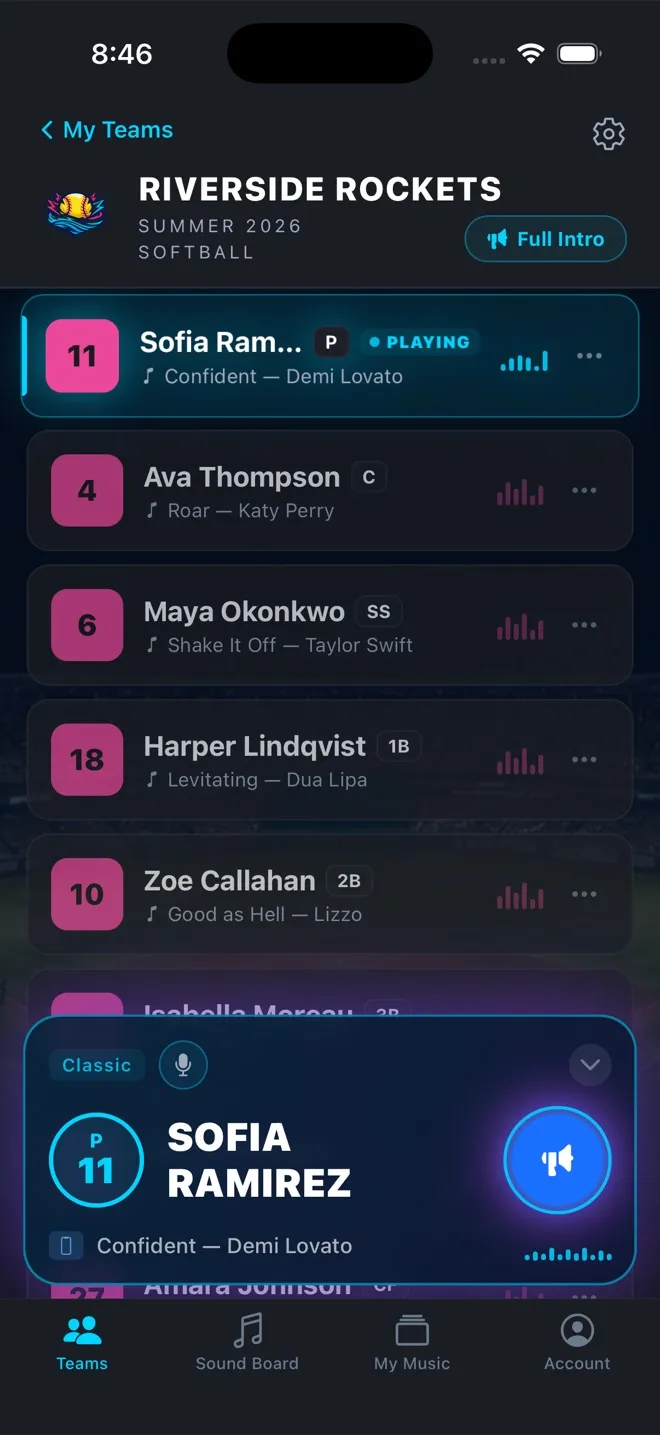
Your batting order in one column — number, name, position, song. Tap a player and the Now Batting bar takes over: announcer, then their song, with one big play button. Add players one at a time, bulk-add, or import.
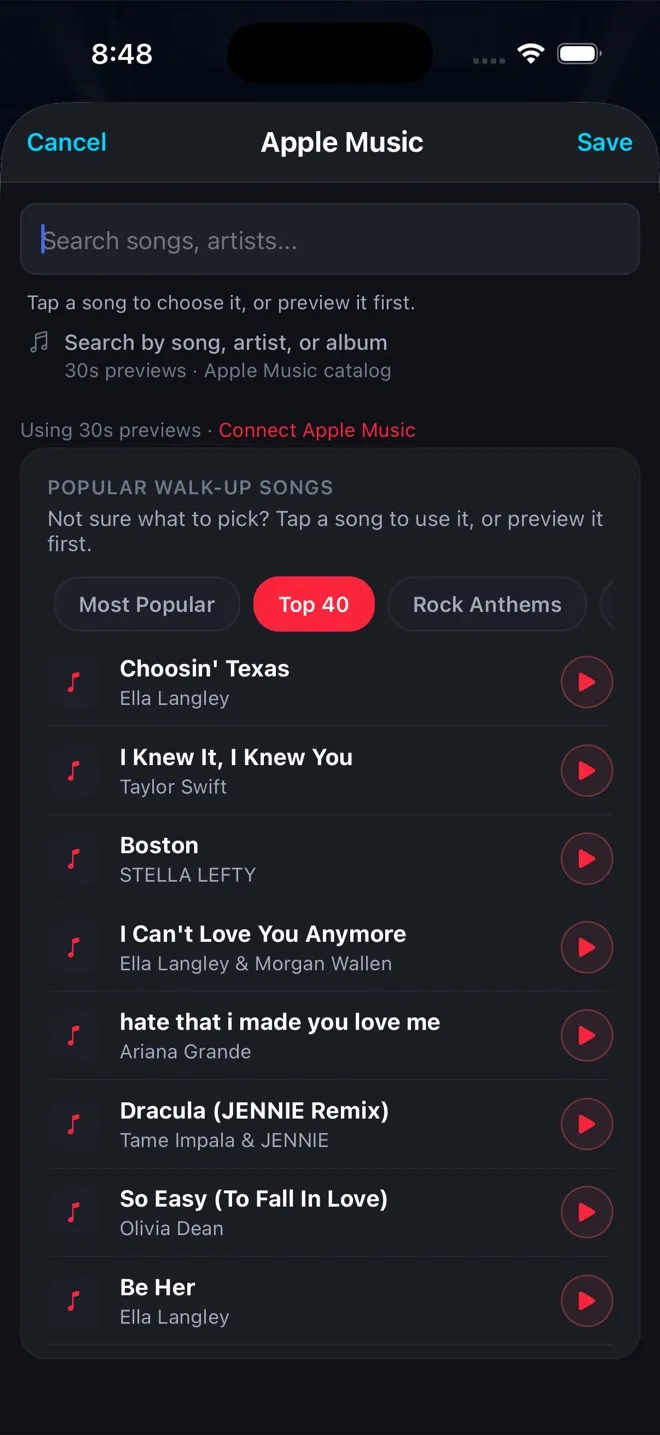
Search songs, artists, or albums, or browse curated walk-up lists — Most Popular, Top 40, Rock Anthems, Hip-Hop — and preview before you choose. No Apple Music subscription needed: every song plays its official 30-second preview, which is longer than a walk-up anyway. Spotify doesn't connect and you don't need it. Subscribers get the full track and any start point on iPhone and Android.
One bad lyric can end a league's walk-up program, so we made the clean version the easy pick. Explicit tracks wear an E in search, and the built-in lists and finder only ever suggest clean versions.
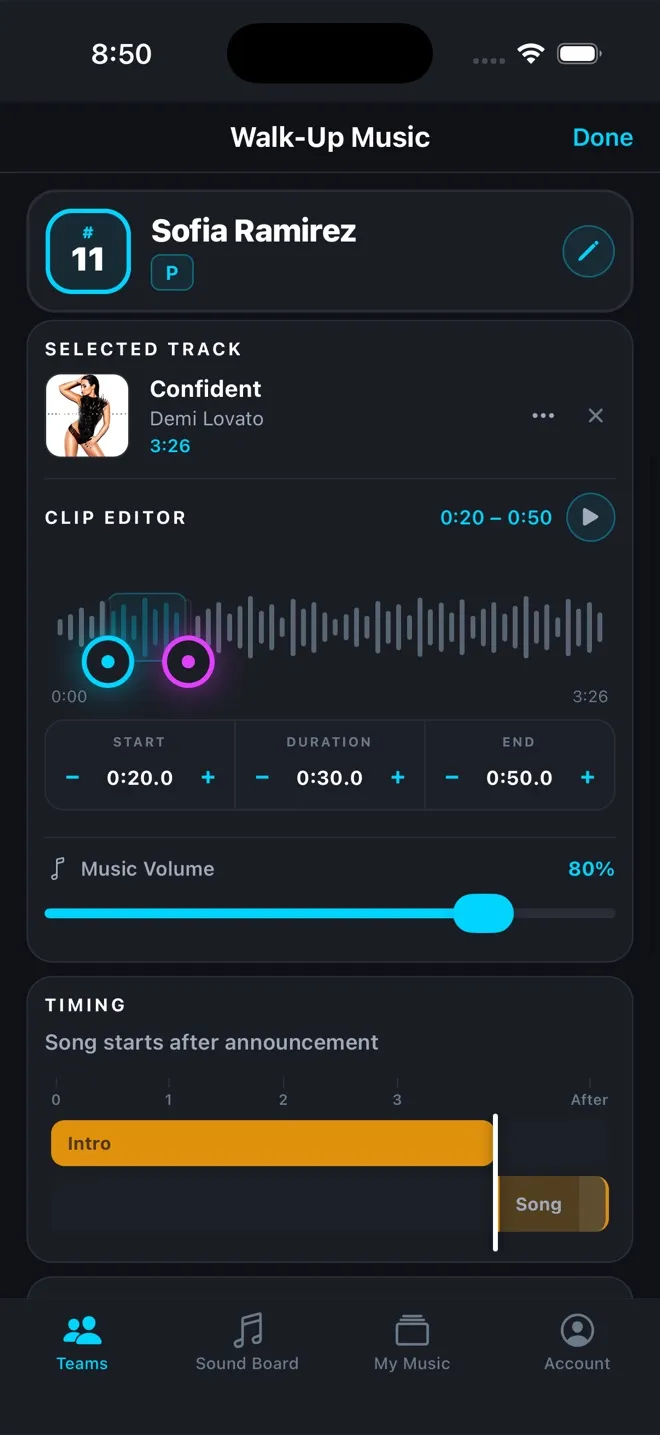
Drag the handles to the drop, set start and duration to the tenth of a second, and decide whether the song starts after the announcement or under it. Spell tricky names phonetically so the announcer nails them.
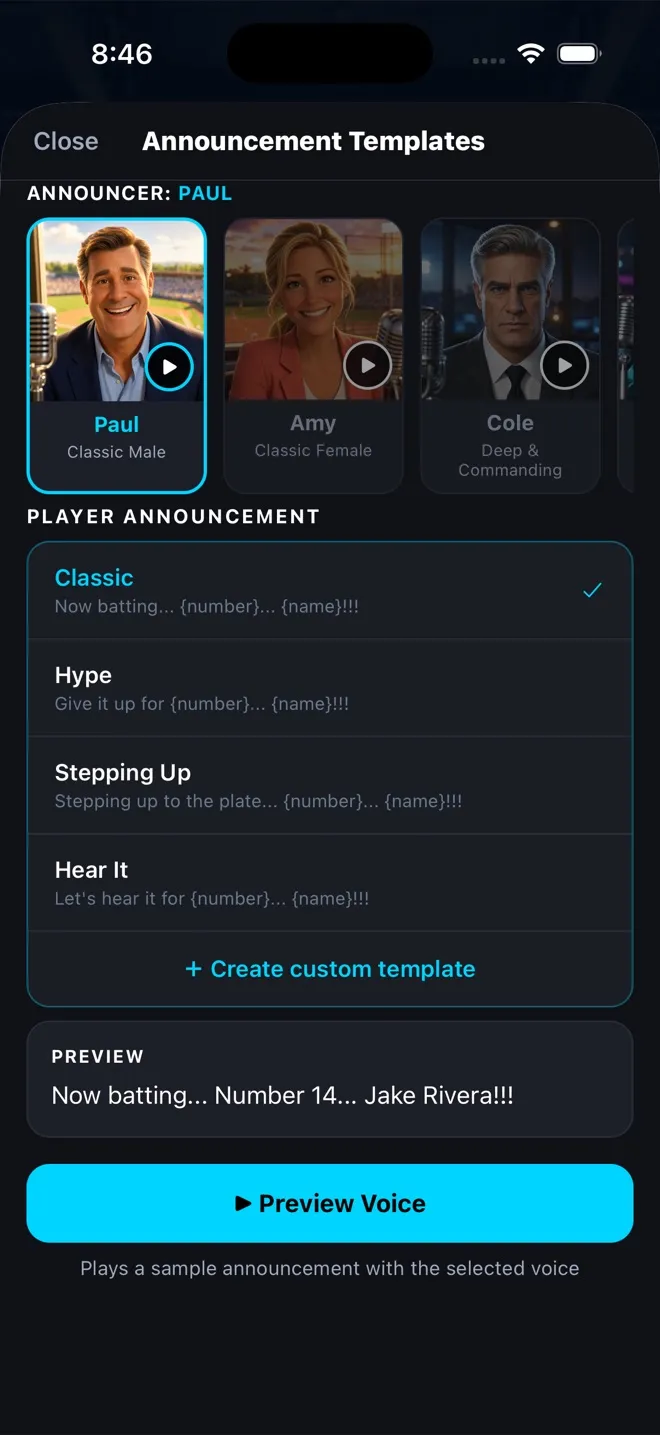
Pick a voice, pick a call — Classic, Hype, Stepping Up, Hear It — or write your own template with the player's number and name. Preview it before the game so there are no surprises at the plate.
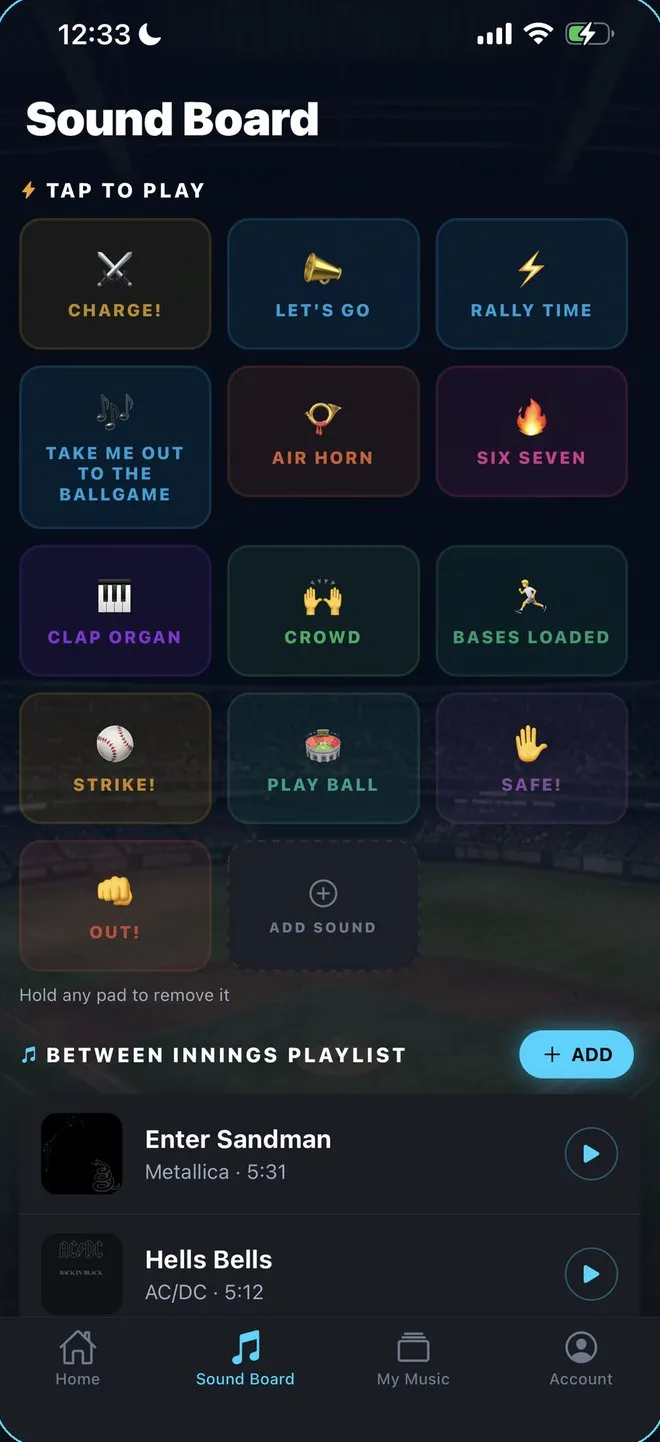
Tap-to-play stadium cues — Charge, Let's Go, Take Me Out to the Ballgame, Clap Organ, Strike, Safe, Out — plus your own sounds. Queue a between-innings playlist so the field never goes quiet.
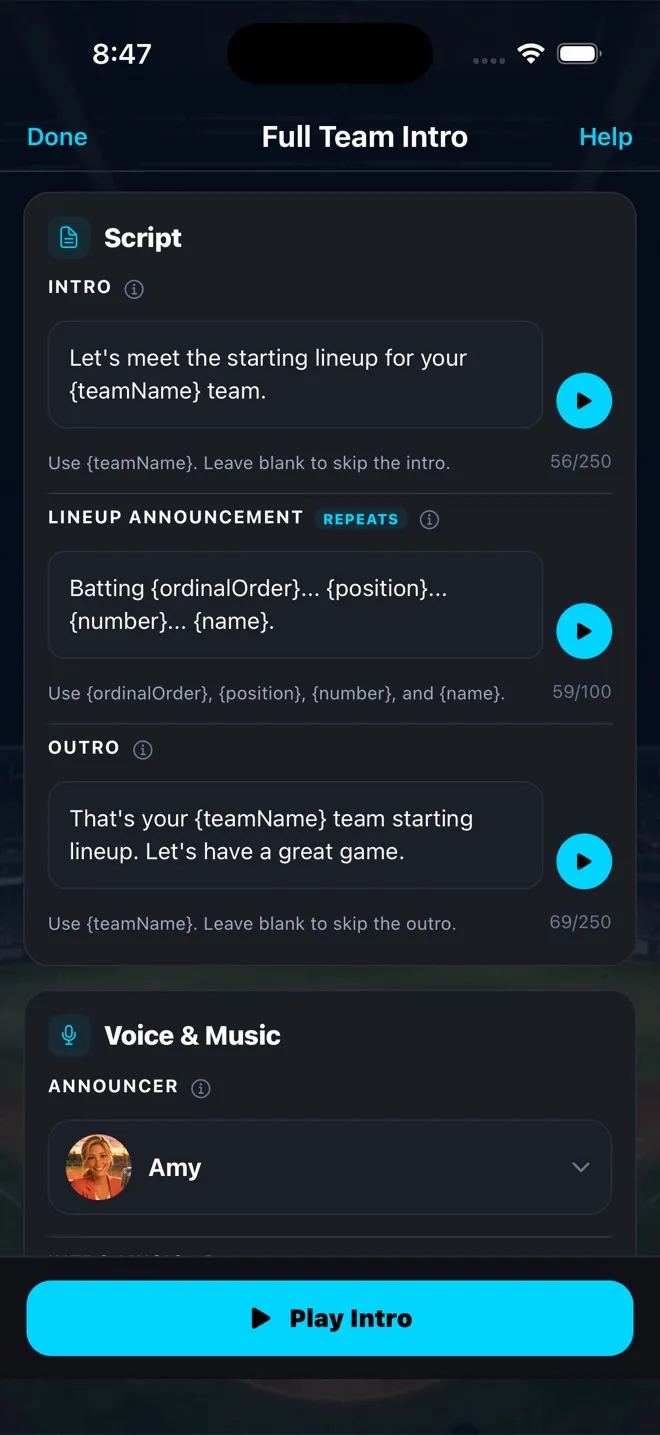
Before first pitch, play a pro-style intro that runs through every player in order — "Batting first… shortstop… number 7… Mason Alvarez" — with your own opener, closer, announcer, and music bed.
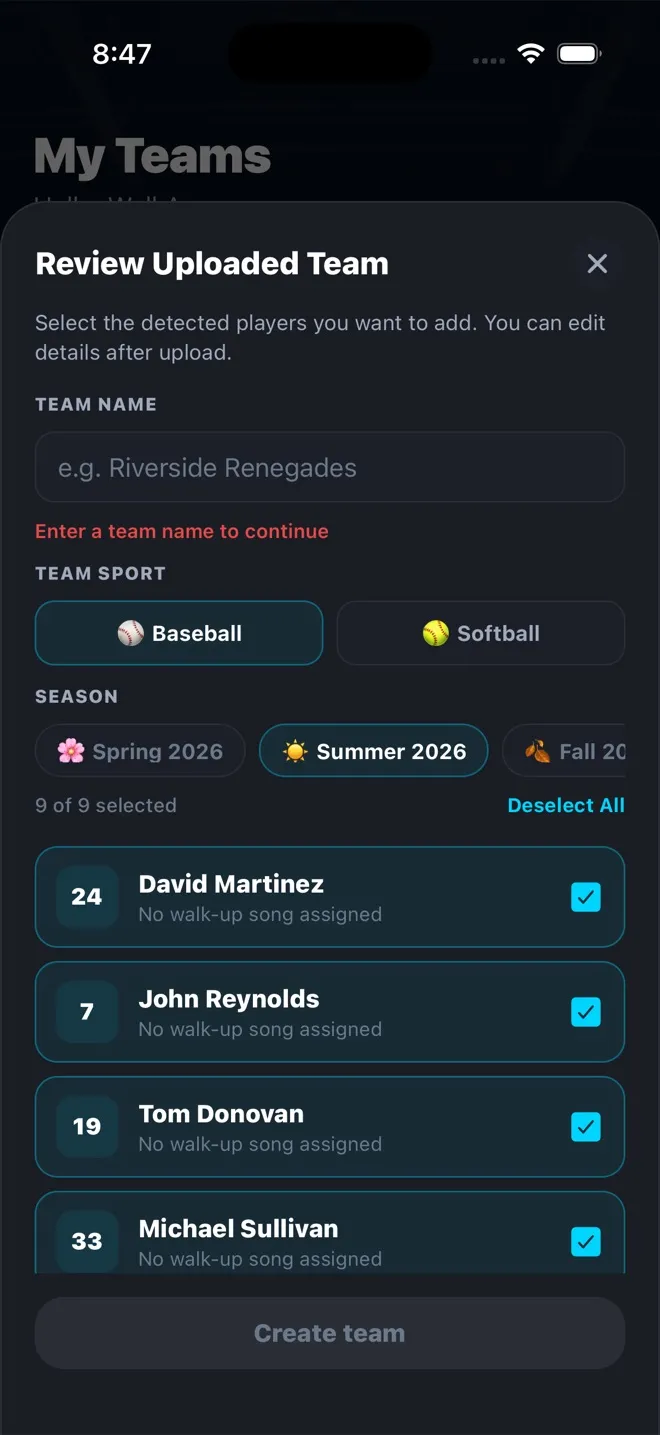
Snap your roster or a screenshot from your league app. WalkAmp reads names and numbers, you tick the players you want, pick the sport and season, and the team is built.
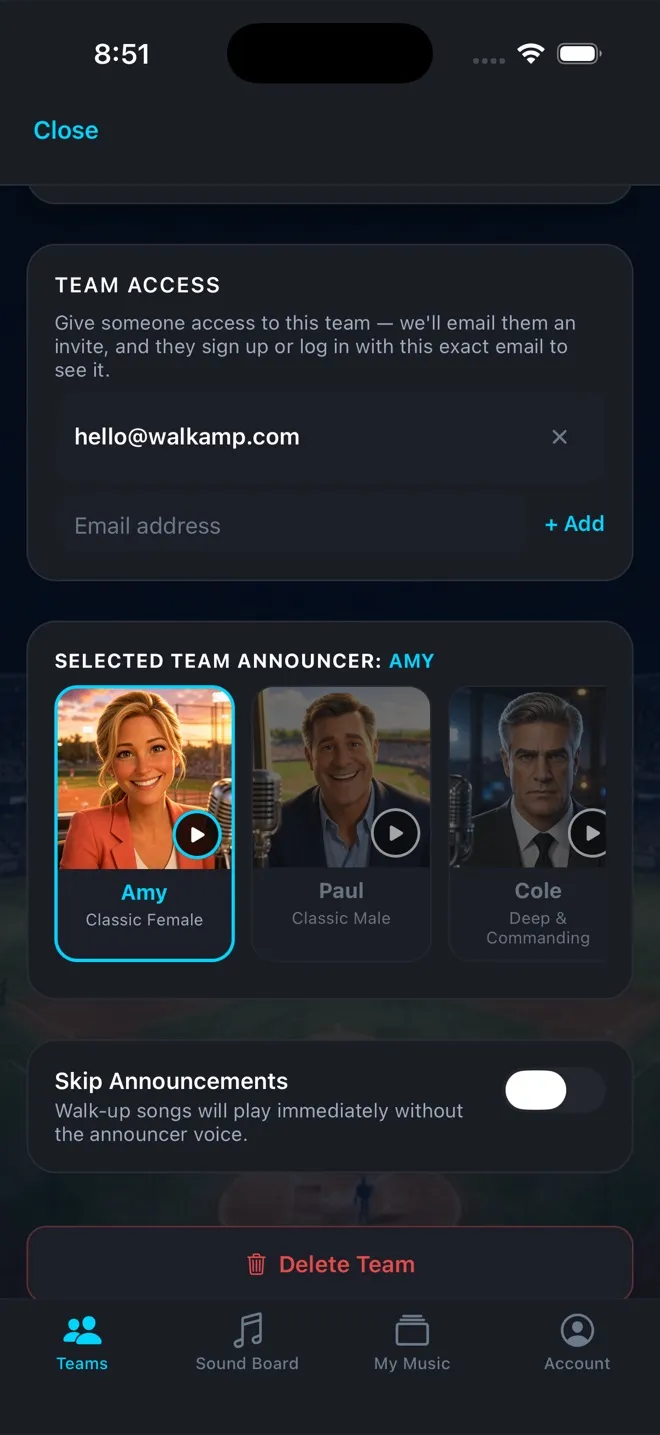
Set a team color, add coaching staff, and give an assistant access by email — they sign in and the team is just there. Pick the team's default announcer, or flip Skip Announcements for music-only games.
Studio-quality voices read every name and number — their own name over the PA, the way the big leagues do it.
Spell it how it sounds — "so-FEE-ah" — and the announcer gets it right every time. No more cringing at the plate.
Travel ball and rec? Keep every team, color, and lineup separate by season and switch in a tap. Coaches get a walk-up song too.
Explicit tracks are marked with an E in search, and the built-in lists and finder only ever suggest clean versions. No player accounts, nothing public, and you can skip announcements for the whole team.
The whole app and the announcer voices come in three languages, so the intro sounds right for your team.
No Apple Music subscription needed. Every song plays its official 30-second preview, which is longer than a walk-up anyway. Spotify doesn't connect and you don't need it.
Download, build your lineup, and run your first games with every feature unlocked. No card required. If the team loves it, a Season Pass keeps it going.
No per-player fees, no add-ons. One price covers the whole roster, every voice, and every team you coach.
Starts with 7 days of full access, free. After that nothing is deleted and nothing charges automatically: your teams stay saved, but you drop to one team and six players until a Season Pass opens the full roster. Season Pass is a 6-month auto-renewing subscription purchased through the App Store or Google Play; cancel anytime in your store settings. Price shown in USD and may vary by region.
No. WalkAmp searches the Apple Music catalog on iPhone and Android, and without a subscription every song plays its official 30-second preview, which is longer than a walk-up anyway.
Spotify doesn't connect and you don't need it. Apple Music subscribers get the full track and can pick any start point.
Yes. WalkAmp is on Google Play.
You get the same Apple Music catalog search, announcers, and soundboard as iOS.
Sign out of the Apple Music app on that phone, then open WalkAmp, go to My Music, and tap Apple Music to sign back in.
It's a known problem in Apple's Android sign-in library, not WalkAmp, and that fix has worked every time. Step-by-step guide with screenshots
Any Bluetooth speaker works — most coaches use a portable party speaker. Your phone is the whole rig.
If your field has a PA, plug your phone into the aux input.
Yes. Every player gets their own intro with their real name and number, set up before the game so it is ready when they step to the plate.
If a name gets tripped up, you can spell it out the way it sounds.
That's who it was built for. Nothing about your players is ever public, and there are no player accounts.
You can mute announcements for the whole team if parents would rather names not be called out loud.
Explicit tracks are marked with an E in search results and on the player's song, so you can see it before you pick. The built-in walk-up lists and the song finder only ever suggest clean versions.
One catch: your own audio files are not screened. The app reminds you when you import them, so give them a listen first.
Nothing is deleted and nothing charges automatically. Your teams and lineups stay saved.
You drop to a single team and six players until a Season Pass opens the full roster.
Yes. Invite them by email from the team's settings and they get full access to run the lineup from their own phone — an assistant coach in the dugout, or a parent up in the stands working the speaker while you coach third.
One catch: songs you added from your own MP3 files don't play on their phone until they add their own copy from My Music. Apple Music songs, Free Music Catalog songs, and WalkAmp Hits play as-is.
Not all of it. Songs added from your own files stay on the phone that added them, so the other coach can't play those until they add their own copy from My Music. Full Apple Music tracks need an Apple Music subscription on their phone; without one, the free 30-second clip plays instead.
Apple Music songs, Free Music Catalog songs, WalkAmp Hits, clip start times, and announcer settings do carry over. WalkAmp doesn't upload or store your music. How to share your team
WalkAmp is built by a small independent team, not a big app company. The people who write the code are the same people reading [email protected], so if something doesn't work at your field, or there's a thing you wish the app did, tell us. It goes straight to the folks who can actually fix it.
— The WalkAmp team
Free to download. Snap your roster and you're ready for the next game.
Scan with your phone — opens the right store for your device.